AIFULL STACK
ZENSHO - AI-POWERED DESKTOP VIDEO EDITOR
Feb 2026 - Present • WEB APP / CLI
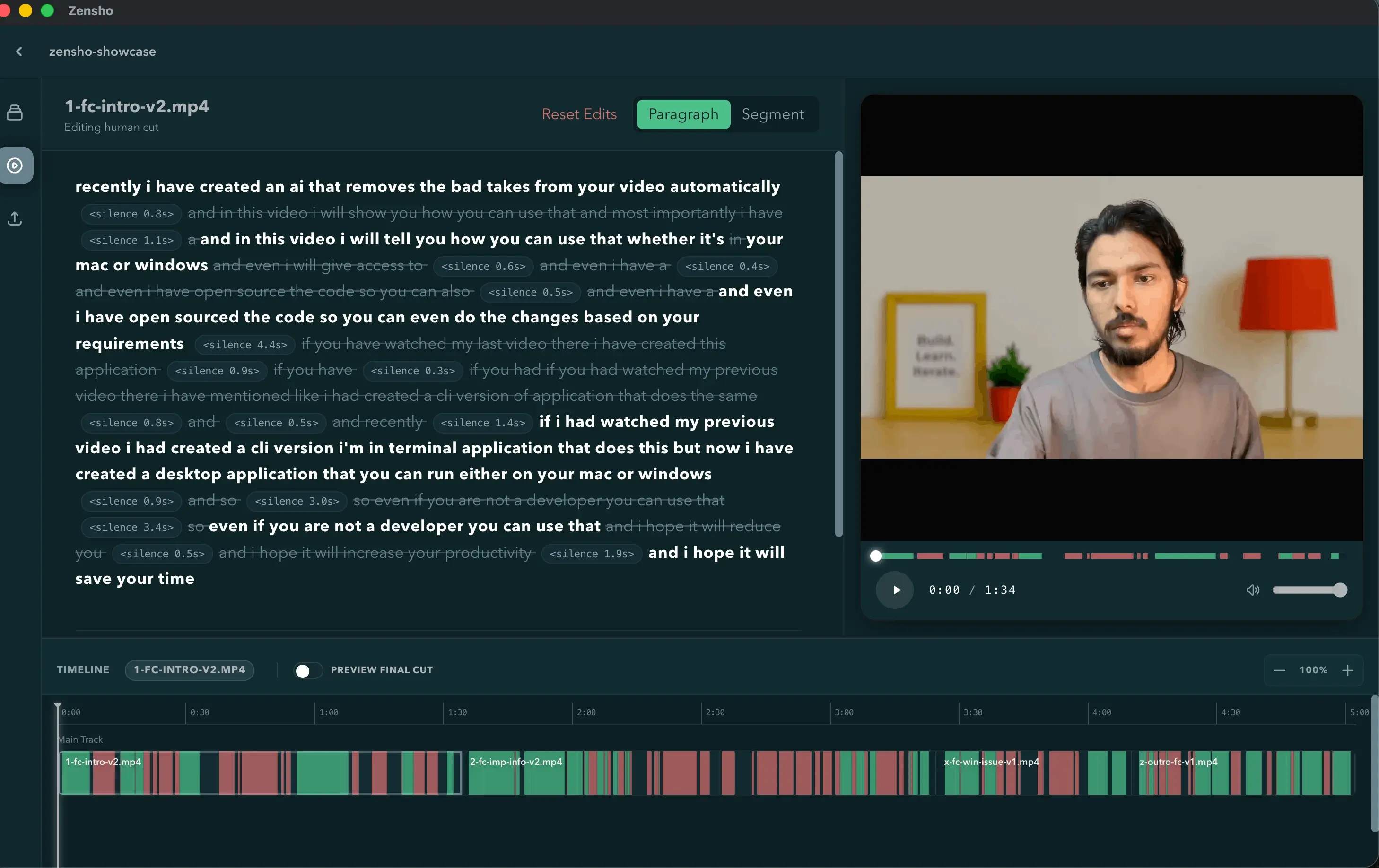
MacOS app showing rough-cut paragraph view
Desktop app that transcribes footage, AI-generates rough cuts, and exports editable timelines to DaVinci Resolve.
THE PROBLEM
Turning raw screencast or facecam footage into a usable rough cut means manually scrubbing through hours of audio to cut stutters, dead air, and rambling takes — tedious work that delays the creative editing that actually matters, and most AI editing tools lock footage into a cloud pipeline or a proprietary subscription instead of a professional NLE workflow.
THE RESULT
Built a full desktop application that transcribes footage, uses an LLM to make AI-driven keep/cut decisions, and exports either directly or as a fully editable OpenTimelineIO timeline for DaVinci Resolve — with a custom LCS-based text-to-timestamp aligner and waveform-aware boundary snapping so cuts land on natural pauses rather than mid-word or mid-syllable.
HOW IT WORKS
Zensho is a hybrid desktop application: an Electron/React/Vite frontend drives a locally-spawned Python FastAPI backend over HTTP (bound to 127.0.0.1 for local-only traffic), chosen specifically so CPU/IO-heavy ffmpeg and transcription work never blocks the UI thread. The processing pipeline runs each video through ffmpeg audio extraction, Deepgram Nova-3 word-level transcription, and an LLM rough-cut pass (via LiteLLM, so any OpenAI-compatible or BYOK provider can be swapped in) that decides what to keep, cut, or treat as silence.
Key technical achievements include:
- Custom LCS-based transcript aligner: the LLM returns only the words worth keeping, and a hand-written Longest-Common-Subsequence dynamic-programming aligner maps that refined script back onto the original word-level timestamps, with 'last-occurrence-wins' tie-breaking so repeated takes resolve to the correct (latest) occurrence, and a minimum-LCS-ratio fallback that preserves all content rather than silently discarding it if the LLM paraphrases instead of cutting.
- Waveform-aware boundary snapping: a separate preprocessor snaps every cut point to the nearest word boundary and then refines further by extracting a PCM window via ffmpeg and finding the minimum-RMS-energy point, so cuts fall in natural pauses instead of mid-syllable — with a repair pass that clamps overlaps and removes now-redundant silence segments between adjacent kept clips.
- Serialized async processing queue: a singleton
asyncio.Queueworker processes one video at a time through aQUEUED → PREPROCESSING → TRANSCRIBING → ROUGH_CUTTING → COMPLETEDstate machine, preventing concurrent ffmpeg instances and LLM rate-limit bans while the UI polls a/statusendpoint for live progress. - Non-destructive DaVinci Resolve export: an OpenTimelineIO exporter builds a multi-FPS-safe
.otiotimeline (plus FCP XML) from the same 'resolved timeline' used for the in-app preview player and MP4 export, linking video/audio clips via matching reel metadata so Resolve treats them as synced pairs — letting editors drag the AI's decisions straight into a professional NLE with every cut still editable. - Human-in-the-loop editing model: AI-generated cuts (
rough_cut_ai) are never overwritten — user edits are stored as a separaterough_cut_humanlayer, with all exporters resolvingrough_cut_human ?? rough_cut_aiper video, so some clips in a project can carry human edits while others still use the raw AI cut. - Dual interface: the same backend core is exposed both through the Electron desktop app and a standalone CLI (
run,process,export,status,config) for scripted or headless use.
TECH STACK
TypeScriptReactViteElectronTailwind CSSPython 3.12+FastAPIUvicornPydanticasyncioDeepgram SDKLiteLLMOpenTimelineIOffmpegloguru
TAGS
ElectronFastAPILLM IntegrationLiteLLMDeepgramOpenTimelineIOLCS Sequence AlignmentWaveform AnalysisAsync Processing QueueIPC Context BridgeBYOKffmpegPydanticState Machine Design